Training and Handling
Download the rapid usage guide for a first look at how to operate the KoomBook
Learning Objectives

- Understand the KoomBook's function, its principale charateristics and its usage situations
- Understand how to connect to the KoomBook hotspot
- Understand how to jointly use the mobile devices
- Learn how to use the media center and the administrative zone
- Learn the main components of device maintenance
The KoomBook...
- KoomBook comes from the Swahili word Kumbuka, or to remember
- Case specifications: 1 on/off button, 1 LED light, 1 micro USB, 1 network jack
- Number of users: An average of 15 users, depending on utilization type and activities
- Battery life: 3 to 5 hours (depending upon usage)
- Storage: From 16Go (SD card) to 500Go (hard drive or SSD disk)
- Range: 10m to 30m depending upon the envrionment. For example, the type of wall material, (brick, concrete, etc.) effects range capabilities.
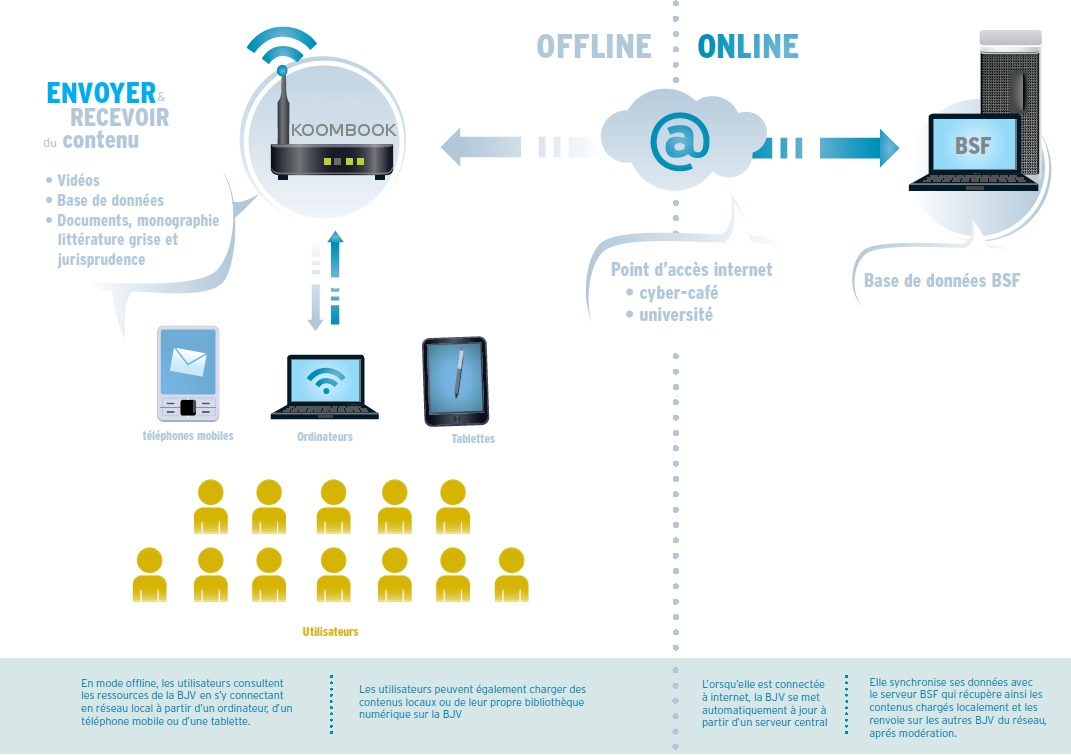
A Client/Servor System
- All data is found on the KoomBook's hard drive
- Like a router, the KoomBook creates a wifi hotspot
- Users connect to the KoomBook and consult the content pre-loaded on the hard drive
KoomBook Composition
- A nano-computer (Processor: 1Ghz, 1Go of rAM)

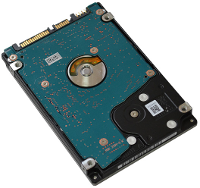
- A hard drive (capacity of 500Go)
- A micro SD card (capacity of 16Go)

- Two wifi transmitters and receptors (holds about 30m, 10 users)

-
A battery (between 3 and 5 hours of battery life)

- A power supply (220v sector - 5V USB)
The case contains a hard drive sensitive to shocks. The case is not water tight,pay attention to water and dust.
List of Material
Find the complete list of material on the document KoomBook assembly
Charging process and powering on

- Time to reach complete charge: 6 hours If the battery is completely drained, complete charging will take a little bit longer.
- Charge the KoomBook out of the sun and in moderate temperature conditions, 25-30°C max
- Universal micro USB mobile telephone charger 5V – 2A provided
- Lithium battery with 3,7V / 7600mAh
- Front button, press and hold for 2 seconds to turn on the device -- it takes 1 minute and 15 seconds to start
Maintenance and updates
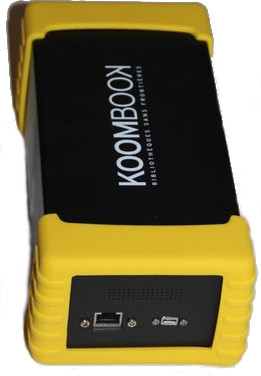
- The case can open if needed
Be aware that all of the interior elements are fragile and must be handled with care
- KoomBook updates are done via Internet. You aren't required to take any action to complete the updates. Simply connect the KoomBook to the ADSL box with an Ethernet RJ45 cable and turn it on. The KoomBook will update automoatically.
Connexion to the wifi hotspot
- Activate wifi on your tablet/computer
- Locate and connect to the KoomBook's wifi hotspot
- Enter the wifi code (refer to the user guide provided upon the KoomBook's delivery)
- Open the navigator linked in the following URL: (don't forget the http://) http://koombook.lan
Usage Precautions
Some usage precautions for a longer product life:
- Place the KoomBook in an cool, dry area
- Do not expose it to the sun
- Handle with care, the KoomBook contains a hard drive sensitive to shock
- Beware of the micro USB charging port; it's fragile
- When connecting the KoomBook to the Internet, try to use the fiber-optic network over wifi -- wifi speed is limited